
Home Assistant Dashboard für deinen Solarspeicher – mit komplettem Code

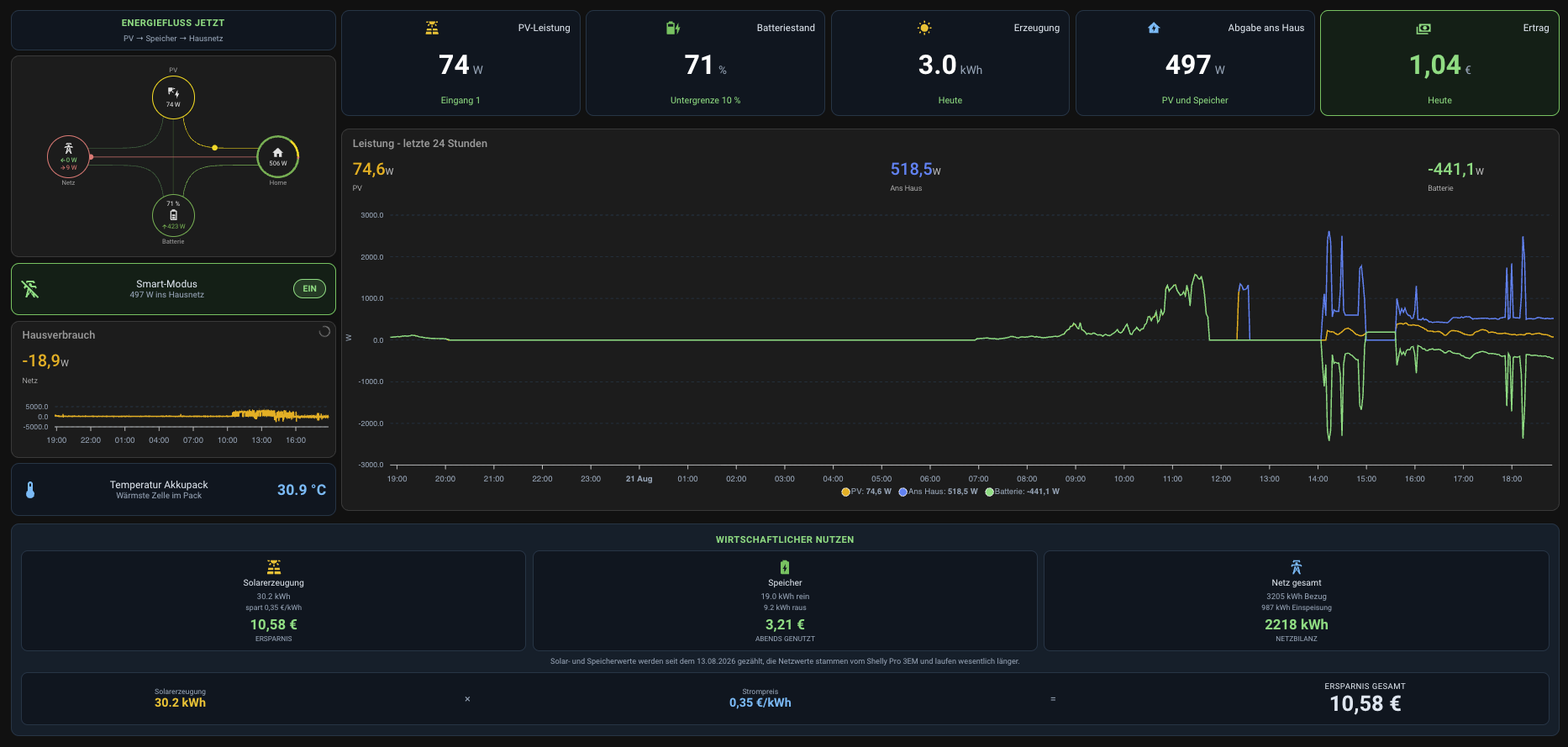
Wer einen Speicher im Haus hat, kennt das: Die Hersteller-App zeigt bunte Zahlen, aber die eine Frage beantwortet sie nie richtig – lohnt sich das Ganze eigentlich? Genau dafür haben wir uns ein eigenes Dashboard in Home Assistant gebaut. Alles auf einem Bildschirm, ohne Cloud, mit echten Euro-Beträgen statt nur Kilowattstunden.
Den kompletten Code findest du weiter unten zum Kopieren.
Was das Dashboard zeigt
Oben links läuft der Energiefluss in Echtzeit: Wie viel kommt gerade von der Sonne, was geht in den Speicher, was zieht das Haus. Daneben die wichtigsten Zahlen als große Kacheln – PV-Leistung, Batteriestand, Erzeugung heute, Abgabe ans Haus und der Ertrag in Euro.
Darunter ein Verlauf über 24 Stunden. Man sieht auf einen Blick, wann die Sonne kam, wann der Speicher geladen hat und wann abends der Verbrauch anzog.
Der interessanteste Teil ist die Leiste ganz unten: Wirtschaftlicher Nutzen. Solarerzeugung mal Strompreis ergibt die tatsächliche Ersparnis. Dazu, wie viel Strom in den Speicher rein- und abends wieder rausgegangen ist, und die Netzbilanz aus Bezug und Einspeisung. Das ist die Zahl, die dir sagt, ob sich die Anlage rechnet.
Wie du so ein Dashboard anlegst
Keine Sorge, du musst nichts programmieren. Der Ablauf ist immer derselbe:
1. Zusatzkarten installieren. Das Dashboard nutzt vier Karten, die nicht ab Werk dabei sind. Du installierst sie über HACS in Home Assistant: power-flow-card-plus, apexcharts-card, button-card und lovelace-layout-card. In HACS suchen, installieren, Home Assistant einmal neu starten.
2. Neues Dashboard anlegen. Unter Einstellungen, dann Dashboards, auf „Dashboard hinzufügen“ klicken und ein leeres anlegen.
3. Code einfügen. Im neuen Dashboard oben rechts auf den Stift klicken, dann auf die drei Punkte und „Raw-Konfigurationseditor“ wählen. Dort alles markieren, löschen und den Code von unten einfügen. Speichern.
4. Entitäten anpassen. Das ist der einzige Schritt, der etwas Fleißarbeit ist – und der wichtigste.
Wichtig: Die Entitäten musst du ersetzen
Jedes Gerät in Home Assistant hat eigene Bezeichnungen. In unserem Code stehen unsere – zum Beispiel sensor.eoe3nep3p100035_solarinputpower für die PV-Leistung oder sensor.shellypro3em_ac151877a150_power für den Shelly am Hausanschluss. Diese kryptischen Kürzel sind bei dir garantiert anders.
Du findest deine eigenen unter Einstellungen, Geräte und Dienste, Reiter Entitäten. Dort suchst du dein Gerät und übernimmst die Bezeichnung. Danach im Code jede Stelle ersetzen. Wenn eine Karte leer bleibt oder „Entität nicht gefunden“ meldet, stimmt genau dort die Bezeichnung noch nicht.
Zwei Dinge brauchst du zusätzlich: einen Helfer namens input_number.strompreis_kwh für deinen Strompreis (anlegen unter Einstellungen, Geräte und Dienste, Helfer) und den Shelly Pro 3EM am Hausanschluss, damit die Netzbilanz stimmt.
Wir bauen dir so ein Dashboard passend zu deiner Anlage – mit deinen Geräten, deinen Entitäten, fertig eingerichtet. Das ist eine kostenpflichtige Dienstleistung. Schreib uns kurz, was du hast, dann sagen wir dir, was es kostet.
 Dashboard anfragen
Anfrage kostenlos, Umsetzung gegen Aufpreis
Was du dafür brauchst
Home Assistant läuft bei uns auf dem OpenKairo Smart Hub 3.0 – einem fertig eingerichteten Mini-Server, den du nur einstecken musst. Wer schon einen Raspberry Pi laufen hat, kann das Dashboard genauso nutzen.
Für die Netzbilanz unten im Dashboard brauchst du zusätzlich einen Zähler am Hausanschluss. Wir nutzen den Shelly Pro 3EM.
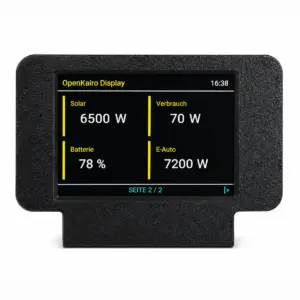
Display für OpenKairo HA
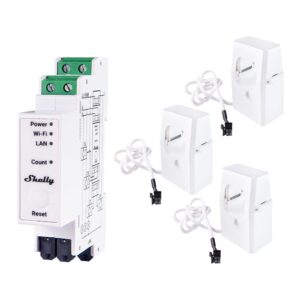
Shelly Pro 3EM 120A
Home Assistant Einrichtungs-Service
Home Assistant Einrichtungsservice – Automatisierung ohne Grenzen Mit unserem Home Assistant Einrichtungsservice machen wir dein Smart Home wirklich smart.Grundsätzlich gilt:
inkl. 19 % MwSt.
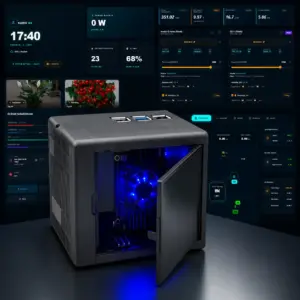
OpenKairo Smart Hub 3.0
Der komplette Code zum Kopieren
Das ist die vollständige Konfiguration unseres Dashboards. Denk daran: Die Entitäten musst du auf deine eigenen ändern, sonst bleiben die Karten leer.
title: Solar Cockpit
views:
- title: Cockpit
path: cockpit
icon: mdi:solar-power-variant
type: custom:grid-layout
layout:
grid-template-columns: 1.35fr 1fr 1fr 1fr 1fr 1fr 1fr
grid-template-rows: auto auto auto
grid-template-areas: |-
"flow k1 k2 k3 k6 k4 k5"
"flow ch ch ch ch ch ch"
"netz sav sav sav sav sav sav"
gap: 12px
padding: 12px
mediaquery:
'(max-width: 1250px)':
grid-template-columns: 1fr 1fr
grid-template-rows: auto
grid-template-areas: |-
"flow flow"
"k1 k2"
"k3 k6"
"k4 k5"
"ch ch"
"netz netz"
"sav sav"
'(max-width: 700px)':
grid-template-columns: 1fr
grid-template-rows: auto
grid-template-areas: |-
"flow"
"k1"
"k2"
"k3"
"k6"
"k4"
"k5"
"ch"
"netz"
"sav"
cards:
- type: vertical-stack
view_layout:
grid-area: flow
cards:
- type: custom:button-card
entity: input_number.strompreis_kwh
show_icon: false
show_name: false
show_state: false
show_label: false
tap_action:
action: none
custom_fields:
c: >-
[[[ return `<div
style="color:#4ade80;font-size:14px;font-weight:600;letter-spacing:.6px;text-transform:uppercase;text-align:center;padding-bottom:8px">Energiefluss
jetzt</div><div
style="color:#8fa6b8;font-size:12px;text-align:center">PV →
Speicher → Hausnetz</div>` ]]]
styles:
card:
- background: '#0b1620'
- border: '1px solid #1c3546'
- border-radius: 12px
- padding: 10px
- box-shadow: none
- height: auto
- overflow: hidden
grid:
- grid-template-areas: '"c"'
- grid-template-columns: 1fr
- grid-template-rows: 1fr
custom_fields:
c:
- justify-self: stretch
- align-self: stretch
- width: 100%
- height: 100%
view_layout:
grid-area: flow
- type: custom:power-flow-card-plus
watt_threshold: 1000
clickable_entities: true
allow_layout_break: true
sort_individual_devices: false
style_card_content: 'zoom: 0.8;'
kwh_decimals: 2
w_decimals: 0
kw_decimals: 2
min_flow_rate: 0.75
max_flow_rate: 6
max_expected_power: 12000
display_zero_lines:
mode: transparency
transparency: 65
entities:
solar:
entity: sensor.growatt_spf_x_2_pv_power
color:
- 255
- 214
- 0
battery:
entity:
consumption: sensor.growatt_spf_battery_power
production: sensor.sonoff_plug_bkw_einspeisung_power
state_of_charge: sensor.growatt_spf_battery_state_of_charge
display_state: one_way
color:
production:
- 76
- 175
- 80
consumption:
- 76
- 175
- 80
home:
entity: sensor.sonoff_plug_bkw_einspeisung_power
override_state: true
subtract_individual: false
individual:
- entity: sensor.growatt_spf_load_power
name: E-Auto (Insel)
icon: mdi:car-electric
color:
- 33
- 150
- 243
display_zero: true
- entity: sensor.sonoff_plug_miner_power
name: S21
icon: mdi:pickaxe
color:
- 247
- 147
- 26
display_zero: true
- entity: sensor.shellyplus1pm_eauto_power
name: E-Auto Netz
icon: mdi:transmission-tower
color:
- 33
- 150
- 243
display_zero: true
- entity: sensor.sonoff_plug_avalonq_power
name: Avalon Q
icon: mdi:pickaxe
color:
- 247
- 147
- 26
display_zero: true
- type: custom:button-card
entity: switch.sonoff_plug_bkw_einspeisung
show_icon: false
show_name: false
show_state: false
tap_action:
action: toggle
hold_action:
action: more-info
custom_fields:
c: >-
[[[ const on =
states['switch.sonoff_plug_bkw_einspeisung'].state === 'on';
const w =
Number(states['sensor.sonoff_plug_bkw_einspeisung_power'].state)||0;
const col = on ? '#4ade80' : '#8fa6b8'; return `<div
style="display:flex;align-items:center;gap:12px;height:100%"><ha-icon
icon='mdi:transmission-tower-import'
style="color:${col};--mdc-icon-size:30px;flex:none"></ha-icon><div
style="flex:1;min-width:0"><div
style="color:#dbe7f0;font-size:15px;white-space:nowrap;overflow:hidden;text-overflow:ellipsis">BKW
Einspeisung</div><div
style="color:#8fa6b8;font-size:12.5px">${on ? w.toFixed(0)+' W
ins Hausnetz' : 'Einspeisung gestoppt'}</div></div><div
style="flex:none;padding:5px
13px;border-radius:20px;font-size:13px;font-weight:600;border:1px
solid ${col};color:${col};background:${on ?
'rgba(74,222,128,.12)' : 'transparent'}">${on ? 'EIN' :
'AUS'}</div></div>` ]]]
styles:
card:
- background: '#0b1620'
- border-radius: 12px
- padding: 13px
- box-shadow: none
- height: 78px
- cursor: pointer
grid:
- grid-template-areas: '"c"'
- grid-template-columns: 1fr
custom_fields:
c:
- justify-self: stretch
- align-self: center
- width: 100%
state:
- value: 'on'
styles:
card:
- border: '1px solid #22c55e'
- background: '#0c2016'
- value: 'off'
styles:
card:
- border: '1px solid #1c3546'
- type: custom:button-card
entity: input_boolean.e_auto_prio
show_icon: false
show_name: false
show_state: false
tap_action:
action: toggle
hold_action:
action: more-info
custom_fields:
c: >-
[[[ const on = states['input_boolean.e_auto_prio'].state ===
'on'; const soc =
Number(states['sensor.growatt_spf_battery_state_of_charge'].state)||0;
const frei = soc > 99; const col = on ? (frei ? '#4ade80' :
'#2196F3') : '#8fa6b8'; const sub = on ? (frei ? 'Speicher voll
– frei' : `Reserviert bis 99 % · jetzt
${soc.toFixed(0)} %`) : 'Normalbetrieb'; return `<div
style="display:flex;align-items:center;gap:12px;height:100%"><ha-icon
icon='mdi:ev-station'
style="color:${col};--mdc-icon-size:30px;flex:none"></ha-icon><div
style="flex:1;min-width:0"><div
style="color:#dbe7f0;font-size:15px;white-space:nowrap;overflow:hidden;text-overflow:ellipsis">E-Auto
Prio</div><div
style="color:#8fa6b8;font-size:12.5px;white-space:nowrap;overflow:hidden;text-overflow:ellipsis">${sub}</div></div><div
style="flex:none;padding:5px
13px;border-radius:20px;font-size:13px;font-weight:600;border:1px
solid ${col};color:${col};background:${on ?
'rgba(33,150,243,.12)' : 'transparent'}">${on ? 'AKTIV' :
'AUS'}</div></div>` ]]]
styles:
card:
- background: '#0b1620'
- border-radius: 12px
- padding: 13px
- box-shadow: none
- height: 78px
- cursor: pointer
grid:
- grid-template-areas: '"c"'
- grid-template-columns: 1fr
custom_fields:
c:
- justify-self: stretch
- align-self: center
- width: 100%
state:
- value: 'on'
styles:
card:
- border: '1px solid #2196F3'
- background: '#0c1a26'
- value: 'off'
styles:
card:
- border: '1px solid #1c3546'
- type: custom:apexcharts-card
header:
show: true
title: Einspeisung BKW
show_states: true
colorize_states: true
graph_span: 24h
apex_config:
chart:
height: 90
toolbar:
show: false
background: transparent
legend:
show: false
dataLabels:
enabled: false
grid:
strokeDashArray: 4
borderColor: '#1c3546'
stroke:
curve: straight
width: 1.8
fill:
type: gradient
gradient:
shadeIntensity: 0.5
opacityFrom: 0.6
opacityTo: 0.05
tooltip:
shared: true
x:
format: dd.MM. HH:mm
xaxis:
labels:
style:
colors: '#8fa6b8'
yaxis:
labels:
style:
colors: '#8fa6b8'
yaxis:
- min: 0
decimals: 0
series:
- entity: sensor.sonoff_plug_bkw_einspeisung_power
name: Einspeisung
type: area
color: '#f9ab00'
group_by:
func: avg
duration: 2min
- type: custom:button-card
entity: sensor.sonoff_temp_garage2_temperature
show_icon: false
show_name: false
show_state: false
tap_action:
action: more-info
custom_fields:
c: >-
[[[ const tmp =
Number(states['sensor.sonoff_temp_garage2_temperature'].state)||0;
const col = tmp>=35 ? '#f87171' : (tmp>=28 ? '#fbbf24' :
'#38bdf8'); return `<div
style="display:flex;align-items:center;gap:12px;height:100%"><ha-icon
icon='mdi:thermometer'
style="color:${col};--mdc-icon-size:30px;flex:none"></ha-icon><div
style="flex:1;min-width:0"><div
style="color:#dbe7f0;font-size:15px;white-space:nowrap;overflow:hidden;text-overflow:ellipsis">Temperatur
Garage</div><div
style="color:#8fa6b8;font-size:12.5px">Miner-Standort</div></div><div
style="flex:none;font-size:22px;font-weight:600;color:${col}">${tmp.toFixed(1)} °C</div></div>`
]]]
styles:
card:
- background: '#0b1620'
- border: '1px solid #1c3546'
- border-radius: 12px
- padding: 13px
- box-shadow: none
- height: 78px
grid:
- grid-template-areas: '"c"'
- grid-template-columns: 1fr
custom_fields:
c:
- justify-self: stretch
- align-self: center
- width: 100%
- type: custom:button-card
entity: sensor.e_auto_soc_stabil
show_icon: false
show_name: false
show_state: false
show_label: false
tap_action:
action: none
custom_fields:
c: >-
[[[ const sst=states['sensor.e_auto_soc_stabil']; const
sliv=states['sensor.e_auto_wican_dcb4d92ae245_local_soc']; const
sn=Number(sst && sst.state); const ln=Number(sliv && sliv.state);
const hasS = sst && isFinite(sn) && sn>0; const hasL = sliv &&
isFinite(ln) && ln>0; const soc = hasS ? sn : (hasL ? ln : null);
const stale = soc!==null && !hasL; const stime = (hasS &&
sst.last_changed) ? new
Date(sst.last_changed).toLocaleTimeString('de-DE',{hour:'2-digit',minute:'2-digit'})
: ''; const sc = soc===null ? '#8fa6b8' : (soc>=80 ? '#4ade80' :
(soc>=50 ? '#38bdf8' : (soc>=20 ? '#fbbf24' : '#f87171'))); const si
= soc===null ? 'mdi:battery-unknown' : (soc>=90 ? 'mdi:battery' :
(soc>=70 ? 'mdi:battery-80' : (soc>=45 ? 'mdi:battery-50' : (soc>=20
? 'mdi:battery-30' : 'mdi:battery-alert')))); const
ip=Number(states['sensor.growatt_spf_load_power'].state)||0; const
np=Number(states['sensor.shellyplus1pm_eauto_power'].state)||0;
const
itd=Number(states['sensor.growatt_spf_x_2_e_auto_ladung_heute'].state)||0;
const
itg=Number(states['sensor.e_auto_ladeenergie_gesamt'].state)||0;
const
ntd=Number(states['sensor.eauto_energy_today_meter'].state)||0;
const ntg=Number(states['sensor.eauto_energy_total_raw'].state)||0;
const pr=Number(states['input_number.strompreis_kwh'].state)||0;
const insel = ip>100; const netz = np>50; const abg = insel ?
'#0c2016' : (netz ? '#2a1618' : '#0b1620'); const abd = insel ?
'#4ade80' : (netz ? '#f87171' : '#1c3546'); const acol = insel ?
'#4ade80' : (netz ? '#f87171' : '#8fa6b8'); const atxt = insel ?
'Lädt von der Insel' : (netz ? 'Lädt aus dem Netz' :
'Nicht am Laden'); const aw = insel ? ip : (netz ? np : 0); const
aval = aw < 1000 ? aw.toFixed(0)+' W' :
(aw/1000).toFixed(2).replace('.',',')+' kW'; const eur = x =>
x.toFixed(2).replace('.',','); const kwh = x => x.toFixed(x<100 ? 1
: 0).replace('.',','); return `<div
style="display:flex;flex-direction:column;height:100%;gap:9px"><div
style="color:#38bdf8;font-size:13px;font-weight:600;letter-spacing:.6px;text-transform:uppercase;text-align:center">E-Auto
Laden</div><div
style="display:flex;flex-direction:column;align-items:center;gap:0px"><ha-icon
icon='${si}' style="color:${sc};--mdc-icon-size:28px"></ha-icon><div
style="font-size:32px;font-weight:600;color:${sc};line-height:1.15">${soc===null
? '––' : soc.toFixed(0)+' %'}</div><div
style="color:#8fa6b8;font-size:11px;text-align:center;line-height:1.3">${soc===null
? 'Fahrzeug-Akku · keine Verbindung' : (stale ?
'Fahrzeug-Akku · Stand '+stime :
'Fahrzeug-Akku')}</div></div><div
style="background:${abg};border:1px solid
${abd};border-radius:9px;padding:7px;text-align:center"><div
style="color:#8fa6b8;font-size:10.5px;letter-spacing:.4px;text-transform:uppercase">${atxt}</div><div
style="font-size:19px;font-weight:600;color:${acol};line-height:1.25">${aval}</div></div><div
style="border-top:1px solid #1c3546;padding-top:8px"><div
style="display:flex;flex-direction:column;gap:5px"><div
style="color:#8fa6b8;font-size:9.5px;letter-spacing:.5px;text-transform:uppercase">Heute
geladen</div><div
style="display:flex;justify-content:space-between;align-items:baseline;gap:6px"><span
style="color:#8fa6b8;font-size:12px">Insel</span><span
style="text-align:right;white-space:nowrap"><span
style="color:#dbe7f0;font-size:12px">${kwh(itd)} kWh</span><span
style="color:#4ade80;font-size:13.5px;font-weight:600;margin-left:8px">kostenlos</span></span></div><div
style="display:flex;justify-content:space-between;align-items:baseline;gap:6px"><span
style="color:#8fa6b8;font-size:12px">Netz</span><span
style="text-align:right;white-space:nowrap"><span
style="color:#dbe7f0;font-size:12px">${kwh(ntd)} kWh</span><span
style="color:#f87171;font-size:13.5px;font-weight:600;margin-left:8px">${eur(ntd*pr)}
€</span></span></div></div></div><div style="border-top:1px
solid #1c3546;padding-top:8px"><div
style="display:flex;flex-direction:column;gap:5px"><div
style="color:#8fa6b8;font-size:9.5px;letter-spacing:.5px;text-transform:uppercase">Gesamt</div><div
style="display:flex;justify-content:space-between;align-items:baseline;gap:6px"><span
style="color:#8fa6b8;font-size:12.5px">Insel</span><span
style="text-align:right;white-space:nowrap"><span
style="color:#dbe7f0;font-size:12.5px">${kwh(itg)} kWh</span><span
style="color:#4ade80;font-size:15px;font-weight:600;margin-left:8px">kostenlos</span></span></div><div
style="display:flex;justify-content:space-between;align-items:baseline;gap:6px"><span
style="color:#8fa6b8;font-size:12.5px">Netz</span><span
style="text-align:right;white-space:nowrap"><span
style="color:#dbe7f0;font-size:12.5px">${kwh(ntg)} kWh</span><span
style="color:#f87171;font-size:15px;font-weight:600;margin-left:8px">${eur(ntg*pr)}
€</span></span></div></div></div><div
style="margin-top:auto;color:#8fa6b8;font-size:9.5px;text-align:center;line-height:1.45">Insel
= eigener Solarstrom, keine Kosten · Netz = gekauft zu
${eur(pr)} €/kWh<br>Umschalter am Ladepunkt – es
läuft immer nur eine Quelle</div></div>`; ]]]
styles:
card:
- background: '#0b1620'
- border: '1px solid #1c3546'
- border-radius: 12px
- padding: 14px
- box-shadow: none
- height: 425px
- overflow: hidden
grid:
- grid-template-areas: '"c"'
- grid-template-columns: 1fr
- grid-template-rows: 1fr
custom_fields:
c:
- justify-self: stretch
- align-self: stretch
- width: 100%
- height: 100%
view_layout:
grid-area: netz
- type: custom:button-card
entity: sensor.pv_ertrag_gesamt_spf_1_x2
show_icon: false
show_name: false
show_state: false
show_label: false
tap_action:
action: more-info
custom_fields:
c: >-
[[[ const v =
(Number(states['sensor.pv_ertrag_gesamt_spf_1_x2'].state)||0).toFixed(1);
return `<div
style="display:flex;flex-direction:column;height:100%;justify-content:space-between"><div
style="display:flex;align-items:center;gap:9px;min-width:0"><ha-icon
icon='mdi:white-balance-sunny'
style="color:#fbbf24;--mdc-icon-size:23px;flex:none"></ha-icon><span
style="color:#dbe7f0;font-size:14.5px;white-space:nowrap;overflow:hidden;text-overflow:ellipsis">Tageserzeugung</span></div><div
style="text-align:center;line-height:1"><span
style="font-size:40px;font-weight:600;color:#ffffff">${v}</span><span
style="font-size:17px;color:#8fa6b8;margin-left:5px">kWh</span></div><div
style="text-align:center;color:#4ade80;font-size:13.5px">Heute</div></div>`
]]]
styles:
card:
- background: '#0b1620'
- border: '1px solid #1c3546'
- border-radius: 12px
- padding: 14px
- box-shadow: none
- height: 158px
- overflow: hidden
- cursor: pointer
grid:
- grid-template-areas: '"c"'
- grid-template-columns: 1fr
- grid-template-rows: 1fr
custom_fields:
c:
- justify-self: stretch
- align-self: stretch
- width: 100%
- height: 100%
view_layout:
grid-area: k3
hold_action:
action: navigate
navigation_path: /history?entity_id=sensor.pv_ertrag_gesamt_spf_1_x2
- type: custom:button-card
entity: sensor.sonoff_plug_bkw_einspeisung_energy_today
show_icon: false
show_name: false
show_state: false
show_label: false
tap_action:
action: more-info
custom_fields:
c: >-
[[[ const v =
(Number(states['sensor.sonoff_plug_bkw_einspeisung_energy_today'].state)||0).toFixed(1);
return `<div
style="display:flex;flex-direction:column;height:100%;justify-content:space-between"><div
style="display:flex;align-items:center;gap:9px;min-width:0"><ha-icon
icon='mdi:home-lightning-bolt'
style="color:#38bdf8;--mdc-icon-size:23px;flex:none"></ha-icon><span
style="color:#dbe7f0;font-size:14.5px;white-space:nowrap;overflow:hidden;text-overflow:ellipsis">BKW
Einspeisung</span></div><div
style="text-align:center;line-height:1"><span
style="font-size:40px;font-weight:600;color:#ffffff">${v}</span><span
style="font-size:17px;color:#8fa6b8;margin-left:5px">kWh</span></div><div
style="text-align:center;color:#4ade80;font-size:13.5px">Heute ins
Hausnetz</div></div>` ]]]
styles:
card:
- background: '#0b1620'
- border: '1px solid #1c3546'
- border-radius: 12px
- padding: 14px
- box-shadow: none
- height: 158px
- overflow: hidden
- cursor: pointer
- transition: border-color .15s ease
grid:
- grid-template-areas: '"c"'
- grid-template-columns: 1fr
- grid-template-rows: 1fr
custom_fields:
c:
- justify-self: stretch
- align-self: stretch
- width: 100%
- height: 100%
view_layout:
grid-area: k6
hold_action:
action: navigate
navigation_path: /history?entity_id=sensor.sonoff_plug_bkw_einspeisung_energy_today
- type: custom:button-card
entity: sensor.growatt_spf_x_2_pv_power
show_icon: false
show_name: false
show_state: false
show_label: false
tap_action:
action: more-info
custom_fields:
c: >-
[[[ const v = (()=>{const
w=(Number(states['sensor.growatt_spf_x_2_pv_power'].state)||0);return
w<1000 ? w.toFixed(0) : (w/1000).toFixed(2).replace('.',',');})();
const u =
((Number(states['sensor.growatt_spf_x_2_pv_power'].state)||0) < 1000
? 'W' : 'kW'); return `<div
style="display:flex;flex-direction:column;height:100%;justify-content:space-between"><div
style="display:flex;align-items:center;gap:9px;min-width:0"><ha-icon
icon='mdi:solar-power-variant'
style="color:#fbbf24;--mdc-icon-size:23px;flex:none"></ha-icon><span
style="color:#dbe7f0;font-size:14.5px;white-space:nowrap;overflow:hidden;text-overflow:ellipsis">PV-Leistung</span></div><div
style="text-align:center;line-height:1"><span
style="font-size:40px;font-weight:600;color:#ffffff">${v}</span><span
style="font-size:17px;color:#8fa6b8;margin-left:5px">${u}</span></div><div
style="text-align:center;color:#4ade80;font-size:13.5px">Beide
Inverter</div></div>` ]]]
styles:
card:
- background: '#0b1620'
- border: '1px solid #1c3546'
- border-radius: 12px
- padding: 14px
- box-shadow: none
- height: 158px
- overflow: hidden
- cursor: pointer
grid:
- grid-template-areas: '"c"'
- grid-template-columns: 1fr
- grid-template-rows: 1fr
custom_fields:
c:
- justify-self: stretch
- align-self: stretch
- width: 100%
- height: 100%
view_layout:
grid-area: k1
hold_action:
action: navigate
navigation_path: /history?entity_id=sensor.growatt_spf_x_2_pv_power
- type: custom:button-card
entity: sensor.growatt_spf_battery_state_of_charge
show_icon: false
show_name: false
show_state: false
show_label: false
tap_action:
action: more-info
custom_fields:
c: >-
[[[ const v =
(Number(states['sensor.growatt_spf_battery_state_of_charge'].state)||0).toFixed(0);
return `<div
style="display:flex;flex-direction:column;height:100%;justify-content:space-between"><div
style="display:flex;align-items:center;gap:9px;min-width:0"><ha-icon
icon='mdi:battery-charging-70'
style="color:#22c55e;--mdc-icon-size:23px;flex:none"></ha-icon><span
style="color:#dbe7f0;font-size:14.5px;white-space:nowrap;overflow:hidden;text-overflow:ellipsis">Batteriestand</span></div><div
style="text-align:center;line-height:1"><span
style="font-size:40px;font-weight:600;color:#ffffff">${v}</span><span
style="font-size:17px;color:#8fa6b8;margin-left:5px">%</span></div><div
style="text-align:center;color:#4ade80;font-size:13.5px">Aktuell</div></div>`
]]]
styles:
card:
- background: '#0b1620'
- border: '1px solid #1c3546'
- border-radius: 12px
- padding: 14px
- box-shadow: none
- height: 158px
- overflow: hidden
- cursor: pointer
grid:
- grid-template-areas: '"c"'
- grid-template-columns: 1fr
- grid-template-rows: 1fr
custom_fields:
c:
- justify-self: stretch
- align-self: stretch
- width: 100%
- height: 100%
view_layout:
grid-area: k2
hold_action:
action: navigate
navigation_path: /history?entity_id=sensor.growatt_spf_battery_state_of_charge
- type: custom:button-card
entity: input_number.strompreis_kwh
show_icon: false
show_name: false
show_state: false
show_label: false
tap_action:
action: more-info
custom_fields:
c: >-
[[[ const v =
((Number(states['sensor.pv_ertrag_gesamt_spf_1_x2'].state)||0)*(Number(states['input_number.strompreis_kwh'].state)||0)).toFixed(2).replace('.',',');
return `<div
style="display:flex;flex-direction:column;height:100%;justify-content:space-between"><div
style="display:flex;align-items:center;gap:9px;min-width:0"><ha-icon
icon='mdi:cash-multiple'
style="color:#4ade80;--mdc-icon-size:23px;flex:none"></ha-icon><span
style="color:#dbe7f0;font-size:14.5px;white-space:nowrap;overflow:hidden;text-overflow:ellipsis">Ertrag
heute</span></div><div style="text-align:center;line-height:1"><span
style="font-size:40px;font-weight:600;color:#4ade80">${v}</span><span
style="font-size:17px;color:#8fa6b8;margin-left:5px">€</span></div><div
style="text-align:center;color:#4ade80;font-size:13.5px">Heute
gesamt</div></div>` ]]]
styles:
card:
- background: '#0c2016'
- border: '1px solid #22c55e'
- border-radius: 12px
- padding: 14px
- box-shadow: none
- height: 158px
- overflow: hidden
- cursor: pointer
grid:
- grid-template-areas: '"c"'
- grid-template-columns: 1fr
- grid-template-rows: 1fr
custom_fields:
c:
- justify-self: stretch
- align-self: stretch
- width: 100%
- height: 100%
view_layout:
grid-area: k5
hold_action:
action: navigate
navigation_path: /history?entity_id=sensor.pv_ertrag_gesamt_spf_1_x2
- type: custom:button-card
entity: sensor.growatt_spf_load_power
show_icon: false
show_name: false
show_state: false
show_label: false
tap_action:
action: navigate
navigation_path: >-
/history?entity_id=sensor.growatt_spf_load_power,sensor.sonoff_plug_miner_power,sensor.sonoff_plug_avalonq_power,sensor.sonoff_plug_bkw_einspeisung_power
custom_fields:
c: >-
[[[ const v = (()=>{const
w=((Number(states['sensor.growatt_spf_load_power'].state)||0) +
(Number(states['sensor.sonoff_plug_miner_power'].state)||0) +
(Number(states['sensor.sonoff_plug_avalonq_power'].state)||0) +
(Number(states['sensor.sonoff_plug_bkw_einspeisung_power'].state)||0));return
w<1000 ? w.toFixed(0) : (w/1000).toFixed(2).replace('.',',');})();
const u =
(((Number(states['sensor.growatt_spf_load_power'].state)||0) +
(Number(states['sensor.sonoff_plug_miner_power'].state)||0) +
(Number(states['sensor.sonoff_plug_avalonq_power'].state)||0) +
(Number(states['sensor.sonoff_plug_bkw_einspeisung_power'].state)||0))
< 1000 ? 'W' : 'kW'); return `<div
style="display:flex;flex-direction:column;height:100%;justify-content:space-between"><div
style="display:flex;align-items:center;gap:9px;min-width:0"><ha-icon
icon='mdi:flash'
style="color:#f87171;--mdc-icon-size:23px;flex:none"></ha-icon><span
style="color:#dbe7f0;font-size:14.5px;white-space:nowrap;overflow:hidden;text-overflow:ellipsis">Verbrauchsleistung</span></div><div
style="text-align:center;line-height:1"><span
style="font-size:40px;font-weight:600;color:#ffffff">${v}</span><span
style="font-size:17px;color:#8fa6b8;margin-left:5px">${u}</span></div><div
style="text-align:center;color:#4ade80;font-size:13.5px">E-Auto +
Miner + BKW</div></div>` ]]]
styles:
card:
- background: '#0b1620'
- border: '1px solid #1c3546'
- border-radius: 12px
- padding: 14px
- box-shadow: none
- height: 158px
- overflow: hidden
- cursor: pointer
grid:
- grid-template-areas: '"c"'
- grid-template-columns: 1fr
- grid-template-rows: 1fr
custom_fields:
c:
- justify-self: stretch
- align-self: stretch
- width: 100%
- height: 100%
view_layout:
grid-area: k4
- type: custom:apexcharts-card
view_layout:
grid-area: ch
header:
show: true
title: PV-Leistung - letzte 24 Stunden
show_states: true
colorize_states: true
graph_span: 24h
apex_config:
chart:
height: 544
toolbar:
show: false
background: transparent
legend:
show: true
position: bottom
labels:
colors: '#8fa6b8'
dataLabels:
enabled: false
grid:
strokeDashArray: 4
borderColor: '#1c3546'
stroke:
curve: straight
width: 1.8
tooltip:
shared: true
x:
format: dd.MM. HH:mm
xaxis:
labels:
style:
colors: '#8fa6b8'
yaxis:
labels:
style:
colors: '#8fa6b8'
title:
text: W
style:
color: '#8fa6b8'
fontWeight: 400
yaxis:
- min: 0
decimals: 0
series:
- entity: sensor.growatt_spf_pv_power
name: Inverter 1
type: line
color: '#4285f4'
stroke_width: 1.8
group_by:
func: avg
duration: 2min
- entity: sensor.growatt_spf_pv_power_3
name: Inverter 2
type: line
color: '#f9ab00'
stroke_width: 1.8
group_by:
func: avg
duration: 2min
- type: custom:button-card
entity: input_number.strompreis_kwh
show_icon: false
show_name: false
show_state: false
show_label: false
tap_action:
action: none
custom_fields:
c: >-
[[[ const
netz_g=Number(states['sensor.eauto_energy_total_raw'].state)||0;
const
pv_g=Number(states['sensor.growatt_spf_x2_pv_energy_total'].state)||0;
const mine_g=Number(states['sensor.miner_energie_insel'].state)||0;
return `<div
style="color:#4ade80;font-size:14px;font-weight:600;letter-spacing:.6px;text-transform:uppercase;text-align:center;padding-bottom:8px">Wirtschaftlicher
Nutzen nach Verbraucher</div><div
style="display:flex;gap:9px;align-items:stretch"><div
style="flex:1;min-width:0;background:#0b1620;border:1px solid
#1c3546;border-radius:10px;padding:11px
6px;display:flex;flex-direction:column;align-items:center;gap:3px"><ha-icon
icon='mdi:home-lightning-bolt'
style="color:#38bdf8;--mdc-icon-size:25px"></ha-icon><div
style="color:#dbe7f0;font-size:13px;text-align:center">Hausnetz
(BKW)</div><div
style="font-size:11.5px;color:#8fa6b8;text-align:center">jetzt <span
style="color:#dbe7f0">${(()=>{const
w=Number(states['sensor.sonoff_plug_bkw_einspeisung_power'].state)||0;
return w<1000 ? w.toFixed(0)+' W' :
(w/1000).toFixed(2).replace('.',',')+' kW';})()}</span></div><div
style="color:#8fa6b8;font-size:12px;text-align:center;line-height:1.45">${(Number(states['sensor.sonoff_plug_bkw_einspeisung_energy_today'].state)||0).toFixed(1)}
kWh<br><span style="font-size:11px">spart
${(Number(states['input_number.strompreis_kwh'].state)||0).toFixed(2).replace('.',',')}
€/kWh</span></div><div
style="font-size:21px;font-weight:600;color:#4ade80;line-height:1.2">${((Number(states['sensor.sonoff_plug_bkw_einspeisung_energy_today'].state)||0)*(Number(states['input_number.strompreis_kwh'].state)||0)).toFixed(2).replace('.',',')}
€</div><div
style="color:#8fa6b8;font-size:10.5px;letter-spacing:.4px;text-transform:uppercase">Ersparnis</div><div
style="margin-top:6px;padding-top:6px;border-top:1px solid
#1c3546;width:100%;text-align:center"><div
style="color:#8fa6b8;font-size:9.5px;letter-spacing:.4px">GESAMT</div><div
style="color:#dbe7f0;font-size:11px">${(Number(states['sensor.bkw_insel_energie'].state)||0).toFixed(0)}
kWh</div><div
style="font-size:15px;font-weight:600;color:#4ade80">${((Number(states['sensor.bkw_insel_energie'].state)||0)*(Number(states['input_number.strompreis_kwh'].state)||0)).toFixed(2).replace('.',',')}
€</div></div></div><div
style="flex:1;min-width:0;background:#0b1620;border:1px solid
#1c3546;border-radius:10px;padding:11px
6px;display:flex;flex-direction:column;align-items:center;gap:3px"><ha-icon
icon='mdi:car-electric'
style="color:#38bdf8;--mdc-icon-size:25px"></ha-icon><div
style="color:#dbe7f0;font-size:13px;text-align:center">Fahrzeug
(Insel)</div><div
style="font-size:11.5px;color:#8fa6b8;text-align:center">jetzt <span
style="color:#dbe7f0">${(()=>{const
w=Number(states['sensor.growatt_spf_load_power'].state)||0; return
w<1000 ? w.toFixed(0)+' W' : (w/1000).toFixed(2).replace('.',',')+'
kW';})()}</span></div><div
style="color:#8fa6b8;font-size:12px;text-align:center;line-height:1.45">${(Number(states['sensor.growatt_spf_x_2_e_auto_ladung_heute'].state)||0).toFixed(1)}
kWh<br><span style="font-size:11px">spart
${(Number(states['input_number.strompreis_kwh'].state)||0).toFixed(2).replace('.',',')}
€/kWh</span></div><div
style="font-size:21px;font-weight:600;color:#4ade80;line-height:1.2">${((Number(states['sensor.growatt_spf_x_2_e_auto_ladung_heute'].state)||0)*(Number(states['input_number.strompreis_kwh'].state)||0)).toFixed(2).replace('.',',')}
€</div><div
style="color:#8fa6b8;font-size:10.5px;letter-spacing:.4px;text-transform:uppercase">Ersparnis</div><div
style="margin-top:6px;padding-top:6px;border-top:1px solid
#1c3546;width:100%;text-align:center"><div
style="color:#8fa6b8;font-size:9.5px;letter-spacing:.4px">GESAMT</div><div
style="color:#dbe7f0;font-size:11px">${(Number(states['sensor.e_auto_ladeenergie_gesamt'].state)||0).toFixed(0)}
kWh</div><div
style="font-size:15px;font-weight:600;color:#4ade80">${((Number(states['sensor.e_auto_ladeenergie_gesamt'].state)||0)*(Number(states['input_number.strompreis_kwh'].state)||0)).toFixed(2).replace('.',',')}
€</div></div></div><div
style="flex:1;min-width:0;background:#0b1620;border:1px solid
#f87171;border-radius:10px;padding:11px
6px;display:flex;flex-direction:column;align-items:center;gap:3px"><ha-icon
icon='mdi:transmission-tower'
style="color:#f87171;--mdc-icon-size:25px"></ha-icon><div
style="color:#dbe7f0;font-size:13px;text-align:center">Fahrzeug
(Netz)</div><div
style="font-size:11.5px;color:#8fa6b8;text-align:center">jetzt <span
style="color:#dbe7f0">${(()=>{const
w=Number(states['sensor.shellyplus1pm_eauto_power'].state)||0;
return w<1000 ? w.toFixed(0)+' W' :
(w/1000).toFixed(2).replace('.',',')+' kW';})()}</span></div><div
style="color:#8fa6b8;font-size:12px;text-align:center;line-height:1.45">${(Number(states['sensor.eauto_energy_today_meter'].state)||0).toFixed(1)}
kWh<br><span style="font-size:11px">kostet
${(Number(states['input_number.strompreis_kwh'].state)||0).toFixed(2).replace('.',',')}
€/kWh</span></div><div
style="font-size:21px;font-weight:600;color:#f87171;line-height:1.2">−${((Number(states['sensor.eauto_energy_today_meter'].state)||0)*(Number(states['input_number.strompreis_kwh'].state)||0)).toFixed(2).replace('.',',')}
€</div><div
style="color:#8fa6b8;font-size:10.5px;letter-spacing:.4px;text-transform:uppercase">Kosten</div><div
style="margin-top:6px;padding-top:6px;border-top:1px solid
#1c3546;width:100%;text-align:center"><div
style="color:#8fa6b8;font-size:9.5px;letter-spacing:.4px">GESAMT</div><div
style="color:#dbe7f0;font-size:11px">${netz_g.toFixed(0)}
kWh</div><div
style="font-size:15px;font-weight:600;color:#f87171">−${(netz_g*(Number(states['input_number.strompreis_kwh'].state)||0)).toFixed(2).replace('.',',')}
€</div></div></div><div
style="flex:1;min-width:0;background:#0b1620;border:1px solid
#1c3546;border-radius:10px;padding:11px
6px;display:flex;flex-direction:column;align-items:center;gap:3px"><ha-icon
icon='mdi:pickaxe'
style="color:#fbbf24;--mdc-icon-size:25px"></ha-icon><div
style="color:#dbe7f0;font-size:13px;text-align:center">Miner (S21 +
Avalon Q)</div><div
style="font-size:11.5px;color:#8fa6b8;text-align:center">jetzt <span
style="color:#dbe7f0">${(()=>{const
w=((Number(states['sensor.sonoff_plug_miner_power'].state)||0)+(Number(states['sensor.sonoff_plug_avalonq_power'].state)||0));
return w<1000 ? w.toFixed(0)+' W' :
(w/1000).toFixed(2).replace('.',',')+' kW';})()}</span></div><div
style="color:#8fa6b8;font-size:12px;text-align:center;line-height:1.45">${((Number(states['sensor.sonoff_plug_miner_energy_today'].state)||0)
+
(Number(states['sensor.sonoff_plug_avalonq_energy_today'].state)||0)).toFixed(1)}
kWh<br><span style="font-size:11px">bringt
${(Number(states['input_number.miner_ertrag_pro_kwh'].state)||0).toFixed(2).replace('.',',')}
€/kWh</span></div><div
style="font-size:21px;font-weight:600;color:#4ade80;line-height:1.2">${(((Number(states['sensor.sonoff_plug_miner_energy_today'].state)||0)
+
(Number(states['sensor.sonoff_plug_avalonq_energy_today'].state)||0))*(Number(states['input_number.miner_ertrag_pro_kwh'].state)||0)).toFixed(2).replace('.',',')}
€</div><div
style="color:#8fa6b8;font-size:10.5px;letter-spacing:.4px;text-transform:uppercase">BTC-Erlös</div><div
style="margin-top:6px;padding-top:6px;border-top:1px solid
#1c3546;width:100%;text-align:center"><div
style="color:#8fa6b8;font-size:9.5px;letter-spacing:.4px">GESAMT</div><div
style="color:#dbe7f0;font-size:11px">${(Number(states['sensor.miner_energie_insel'].state)||0).toFixed(0)}
kWh</div><div
style="font-size:15px;font-weight:600;color:#4ade80">${((Number(states['sensor.miner_energie_insel'].state)||0)*(Number(states['input_number.miner_ertrag_pro_kwh'].state)||0)).toFixed(2).replace('.',',')}
€</div></div></div></div><div
style="margin-top:8px;display:flex;justify-content:center;gap:22px;flex-wrap:wrap;font-size:11.5px;color:#8fa6b8"><span><span
style="color:#38bdf8">■</span> Ersparnis = vermiedener
Netzbezug</span><span><span style="color:#fbbf24">■</span>
Erlös = Bitcoin-Gegenwert, Inselstrom → keine
Stromkosten</span><span><span style="color:#f87171">■</span>
Kosten = gekaufter Netzstrom</span></div><div
style="margin-top:6px;text-align:center;font-size:11.5px;color:#8fa6b8">Inselanlage
– alles Erzeugte wird genutzt, daher voller Tagesertrag zum
Strompreis. Die Kacheln oben zeigen die gemessenen
Einzelverbraucher.</div><div
style="margin-top:10px;background:#0b1620;border:1px solid
#1c3546;border-radius:10px;padding:12px;display:flex;justify-content:space-around;align-items:center;flex-wrap:wrap;gap:14px"><div
style="text-align:center"><div
style="color:#8fa6b8;font-size:11px">PV-Ertrag gesamt</div><div
style="font-size:18px;font-weight:600;color:#fbbf24">${pv_g.toFixed(0)}
kWh</div></div><div
style="color:#8fa6b8;font-size:16px">−</div><div
style="text-align:center"><div
style="color:#8fa6b8;font-size:11px">Mining-Verbrauch
gesamt</div><div
style="font-size:18px;font-weight:600;color:#fbbf24">${mine_g.toFixed(0)}
kWh</div></div><div
style="color:#8fa6b8;font-size:16px">×</div><div
style="text-align:center"><div
style="color:#8fa6b8;font-size:11px">Strompreis</div><div
style="font-size:18px;font-weight:600;color:#38bdf8">${(Number(states['input_number.strompreis_kwh'].state)||0).toFixed(2).replace(".",",")}
€/kWh</div></div><div
style="color:#8fa6b8;font-size:16px">+</div><div
style="text-align:center"><div
style="color:#8fa6b8;font-size:11px">Mining-Ertrag gesamt
(BTC)</div><div
style="font-size:18px;font-weight:600;color:#fbbf24">${(mine_g*(Number(states['input_number.miner_ertrag_pro_kwh'].state)||0)).toFixed(2).replace(".",",")}
€</div></div><div
style="color:#8fa6b8;font-size:16px">−</div><div
style="text-align:center"><div
style="color:#8fa6b8;font-size:11px">Netzladung gesamt</div><div
style="font-size:18px;font-weight:600;color:#f87171">${netz_g.toFixed(0)}
kWh</div></div><div style="color:#8fa6b8;font-size:16px">=</div><div
style="text-align:center;min-width:150px"><div
style="color:#dbe7f0;font-size:12px;letter-spacing:.5px">WIRTSCHAFTLICHES
ERGEBNIS</div><div
style="font-size:32px;font-weight:700;color:#dbe7f0;line-height:1.2">${((pv_g-mine_g-netz_g)*(Number(states['input_number.strompreis_kwh'].state)||0)
+
mine_g*(Number(states['input_number.miner_ertrag_pro_kwh'].state)||0)).toFixed(2).replace(".",",")}
€</div></div></div><div
style="margin-top:6px;text-align:center;font-size:10.5px;color:#8fa6b8">PV-Ertrag
gezählt seit 01.11.2025 · Mining-Verbrauch seit
01.02.2026 · Netzladung seit 08/2025 (unterschiedlicher
Start, da der Miner-Zähler später eingerichtet
wurde)</div>` ]]]
styles:
card:
- background: '#0f1f2b'
- border: '1px solid #1c3546'
- border-radius: 12px
- padding: 14px
- box-shadow: none
- height: auto
- overflow: hidden
grid:
- grid-template-areas: '"c"'
- grid-template-columns: 1fr
- grid-template-rows: 1fr
custom_fields:
c:
- justify-self: stretch
- align-self: stretch
- width: 100%
- height: 100%
view_layout:
grid-area: sav